netfabb

netfabb Studio Professional

Advanced 3D Printing software at an affordable price

netfabb Studio Professional is an affordable mesh edit, repair, analysis and slicing software for 3D Printing and Additive Manufacturing. Intended for multiple installations, netfabb Studio is complemented by Professional and Premium Tools to tailor the capabilities of individual seats while maintaining a common software platform within the organisation.netfabb

For a detailed list of functions, compared with our free netfabb Studio Basic, click here.

For a summary of the top 5 reasons to upgrade to netfabb Studio Professional please click here.

For multiple users
netfabb Studio Professional is priced at a very affordable level to enable organisations to install multiple seats and make 3D Printing software commonly available across your business. Give access to managers and engineers who need more than only a viewer to keep track of what is going on. In combination with the netfabb Studio Basic, it creates a common 3D Printing platform to be installed in an unlimited number of computers.


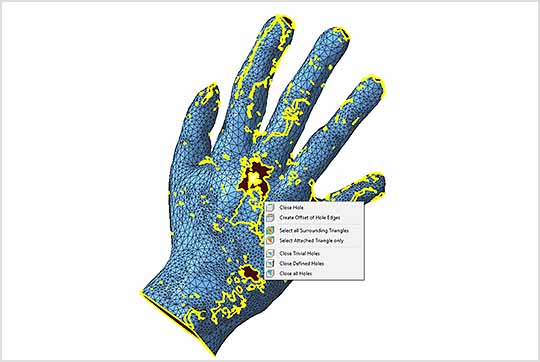
Advanced Mesh Edit and Repair
The mesh edit and repair tools of netfabb Studio Professional are powerful and can fix most errors which occur when you export CAD files to STL. Damaged files can result in failed builds, but efficient fixing of input files will result in a higher success rate of builds. More info...

STL Repair Option and File Fixing Option

File reduction
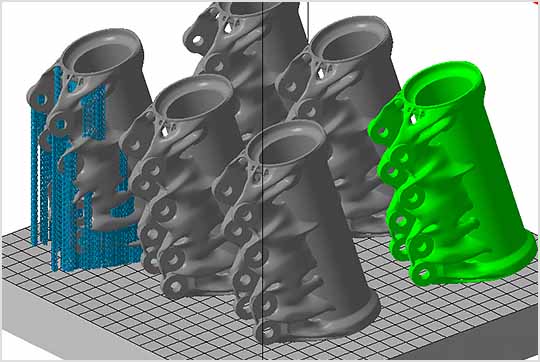
If the original file is too large to pack multiple parts in your build platform, the triangle reduction function of netfabb Studio Professional can reduce the file size as needed. Often the original CAD file contains much more data than necessary for 3D Printing, and reduction of the file size can be done without visible effects on the produced part.


Example: 56 MB / 1,162,000 triangles    -->    15 MB / 310,000 triangles    -->    1.2 MB / 25,500 triangles    -->    42 kB / 818 triangles

Surface cutting
The new surface cutting tool allows you to draw lines on the surface of your part, insert them into the mesh and thereby cut the surface with a defined cutting line. More info...

Extrude surfaces
This tool allows you to extrude surfaces or selected triangles. Effectively, you move the selection by any chosen distance in any chosen direction. More info...

Boolean operations
The Boolean functions of netfabb Studio Professional offer a precise boolean algorithm for high quality merging, subtraction and intersection. More info...

Free cutting
With this tool, you can define free cutting planes independently from the three main axes or draw a polygon line on your screen and cut this line through your parts. More info...

The cutting plane of the free cutting tool

Split Large Files
If your STL files are very complex, scale and split them into several parts before opening them. Thus, not the whole part has to be loaded at once. More info...

Compatible with most 3D Printing and Additive Manufacturing systems
netfabb Studio Professional can be used together with most 3D Printers and Additive Manufacturing systems and offers a very useful complement to the machine supplied software.

Work with 3D and 2D file formats
netfabb Studio Professional can import from and export to several 3D and 2D file formats including STL, X3D, GTS, Wavefront Object, SLI, CLI, SLC and SSL.
With the additional tool Slice Commander, netfabb can also create the slice file formats ABF, CLS, CLF, USF and image files with the formats PNG, SVG, BMP and DXF.

Mobility
netfabb Studio can synchronize and exchange files with netfabb Mobile, the netfabb iPhone application for STL viewing and management. This enables you to download files for review anywhere you go and easily transfer the files when back in the office. netfabb Mobile is also a fantastic presentation tool on the road. More info about the mobile connectivity options here.

Documents

download pdf engine Take control of your CAD Data

download pdf engine A powerful business solution

 
Related Products


Online Store


Quote